Screen recording settings explained: bitrate, resolution, fps and file size
Three numbers decide how a recording looks and how big it gets. Here is what each one does.
 LAAGU··2 min readTimeline
The three numbers
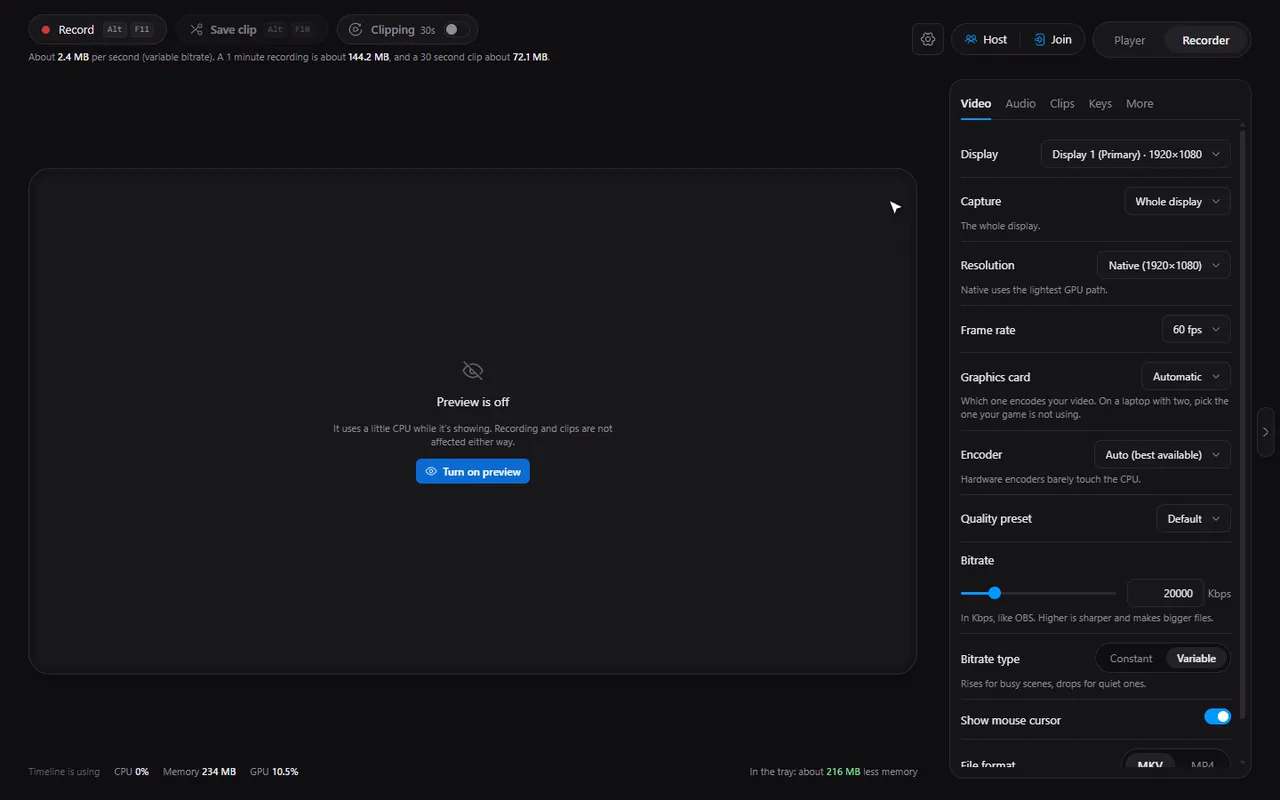
- Resolution: how many pixels in each picture. Native is your screen's own size, the most direct route for the graphics card (no scaling). Smaller sizes shrink the file; you can also type a custom size (even numbers only).
- Frame rate: pictures per second. The default is 60 fps: smooth for games and scrolling. Lower rates save space for slow content like tutorials.
- Bitrate: how much data each second of video may use, in Kbps. It sets sharpness more than anything: higher is sharper and the file is bigger.
What Timeline starts with
| Setting | Default |
|---|---|
| Resolution | Native |
| Frame rate | 60 fps |
| Bitrate | 20,000 Kbps |
| Bitrate type | Variable |
| Encoder | Auto |
| File format | MKV |
| Audio quality | 160 kbps |
Try it in Timeline
Free for Windows 10 and 11. One installer, nothing else to set up.
How big will it be?
File size is simple arithmetic: bitrate times time, divided by 8 to turn bits into bytes. At the default video bitrate of 20,000 Kbps plus 160 kbps of audio:
| Length | Roughly |
|---|---|
| 30 seconds (a clip) | 76 MB |
| 1 minute | 150 MB |
| 10 minutes | 1.5 GB |
| 1 hour | 9 GB |
These are estimates: with Variable bitrate the real number moves with the picture. The Clips tab shows a live estimate ("About N MB per clip at the current quality").
Constant or variable bitrate
| Type | How it behaves |
|---|---|
| Variable | Rises for busy scenes and drops for quiet ones: good quality for the size |
| Constant | Held steady at the bitrate you set: predictable size and a steady stream |
Picking numbers for a goal
- Best quality for editing: Native, 60 fps, a high bitrate (the slider goes up to 100,000 Kbps).
- Small files to share: lower the bitrate, or keep it and compress afterwards to a size limit.
- Long sessions: watch the free-space readout; Timeline stops cleanly when the disk is nearly full (see recovery and the disk guard).
Tip. A higher bitrate does not fix a low resolution, and a higher resolution needs a higher bitrate to look sharp. Change them together.
Questions
What is the default bitrate?
20,000 Kbps, variable, at 60 fps and native resolution.
How big is a one-minute recording?
About 150 MB at the defaults. The size scales with bitrate.
Should I use constant or variable bitrate?
Variable suits most recordings: it gives quality where the picture is busy. Constant keeps a steady rate if you need predictable size.
What is the highest bitrate I can set?
The bitrate slider goes up to 100,000 Kbps.