
See what you are recording: the live preview, free space and resource stats
Know that the right screen is being recorded before you start, and what the recorder is using while it runs.
 LAAGU··2 min readTimeline
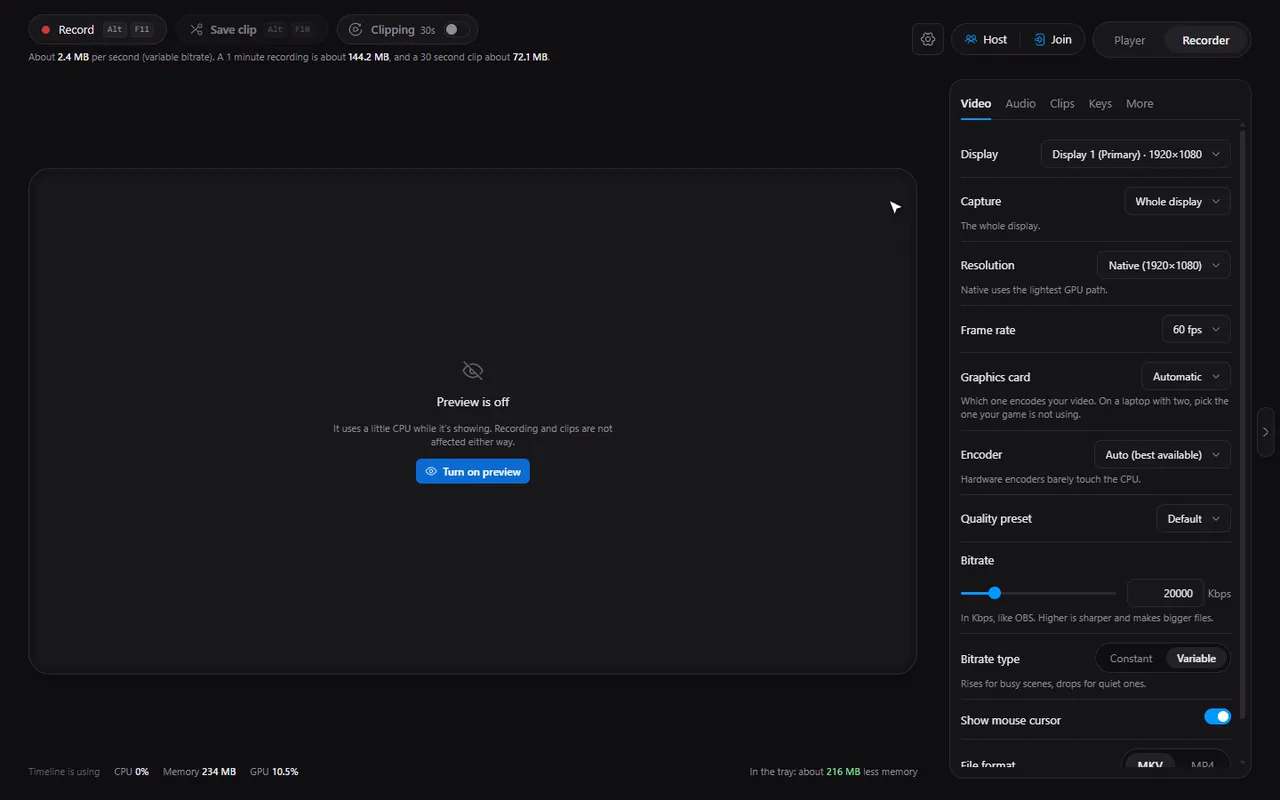
The live preview
The Recorder tab shows a live preview of the display you are about to record. It is how you check the right monitor is selected and that the picture is what you expect. While you record it carries a REC badge with the elapsed time, and a BUFFER chip when the clip buffer is on.
- The preview runs at 12 frames per second and is 640 pixels wide: enough to check what is on screen, light enough not to matter.
- It is a separate, small process, not part of the recording itself, so it does not change how your recording is made.
- The preview only exists while you can see it. When it is hidden, the process is gone and costs nothing.
Try it in Timeline
Free for Windows 10 and 11. One installer, nothing else to set up.
When the preview stops
The preview switches itself off when you turn it off (the eye button on the preview), when you move to the Player tab, when the window is minimised or hidden, when Timeline moves to the tray, and when you quit. If the preview fails for any reason, the card says so and offers Try again; your recording is not affected.
Note. The frames are passed to the window inside the app. There is no local web server that other programs or web pages could reach, so a preview of your desktop is never exposed on your network or to other apps.
The numbers
Under the preview and the control bar the Recorder shows:
- How much space recordings and clips will take at the current settings, and how much is free on the disk.
- Timeline's own CPU, memory and GPU use, so you can see what the recorder costs on your PC.
- The state of the clip buffer and how full it is.
Those numbers are the quickest way to answer "what does recording do to my PC?" for your own hardware, rather than trusting anyone else's benchmark.
Using the numbers
- Space is tight? Lower the bitrate, or the clip length. See bitrate, resolution and fps explained.
- GPU is busy in your game? Turn off ambient mode and keep the preview hidden while you play.
- Want to see the right monitor? Change Display in the Video tab; the preview restarts on the new one.
Questions
Does the live preview slow down recording?
It is a separate small process at 12 fps and 640 px wide, and it only runs while it is visible. When it is hidden, it is not running at all.
Can I turn the preview off?
Yes, with the eye button on the preview. It also stops by itself when the window is hidden or you switch tabs.
Is my screen preview visible to other apps?
No. The frames go straight to the Timeline window; there is no local web server for them.